

Dans votre Logiciel Tattoogenda studio,
vous trouverez vos paramètres en bas à gauche de votre écran, au-dessus du nom de votre studio.
Accédez à vos paramètres et choisissez ‘Administration’
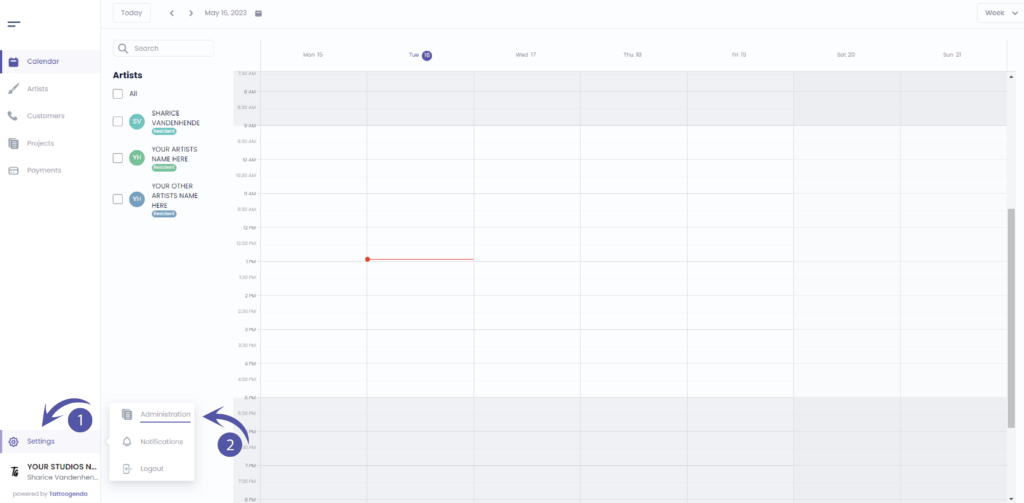
Vous devez automatiquement être sur la table ‘Boutique’, Si vous ne l'êtes pas, cliquez sur le magasin.

INVOICE ADDRESS DETAILS
We partnered up with Stripe to handle secure billing for Tattoogenda subscriptions. Please note that when you paid for your Tattoogenda Subscription,
you already had to fill out your company address and VAT or self employment number. Those invoice details are securely stored with Stripe.
If you wish to update your invoice details click on the article below
The fields listed below are only for your own purpose, and won’t be used on your invoices.
Street & Number
Enter a valid address
City
Enter a valid City
Zip code / Postal code
Enter your valid zip or postal code
Pays
Select your country
Enter your VAT number
Select your VAT number if you have one registered

Vous avez encore un problème ou une question ?
Vous trouverez ci-dessous un petit lien intitulé ‘Toujours bloqué ? Comment pouvons-nous vous aider ?’
Rédigé par
Sharice Vandenhende
Par Tattoogenda


 English
  Dutch
Dutch  Dutch (Belgium)
  French
  German
  Spanish