

Dans votre Logiciel Tattoogenda studio,
vous trouverez vos paramètres en bas à gauche de votre écran, au-dessus du nom de votre studio.
Accédez à vos paramètres et choisissez ‘Administration’
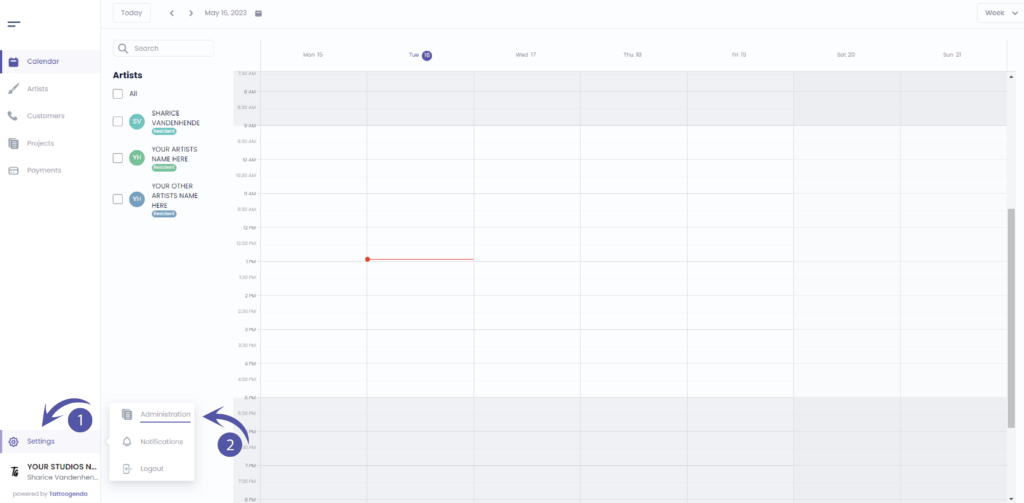
Vous devez automatiquement être sur la table ‘Boutique’, Si vous ne l'êtes pas, cliquez sur le magasin.

GENERAL INFO
Shop name
The name artists will be able to see when they are logged into their account.
The name that will display as a variable into your automated emails.
Company name
Your registered / licensed company name for your VAT number for invoices.
Please note if you are using a Third party for deposits your invoice address will be what’s registered with your Stripe or Mollie account.
Company email
The email which u used to create the account.
The email that will receive the communications.
Phone
The phone number will be used as a variable for your automated emails.
Website / Social Media URL
Will be used as a variable to show into your automated emails.

Vous avez encore un problème ou une question ?
Vous trouverez ci-dessous un petit lien intitulé ‘Toujours bloqué ? Comment pouvons-nous vous aider ?’
Rédigé par
Sharice Vandenhende
Par Tattoogenda


 English
  Dutch
Dutch  Dutch (Belgium)
  French
  German
  Spanish