

In uw Tattoogenda studio software,
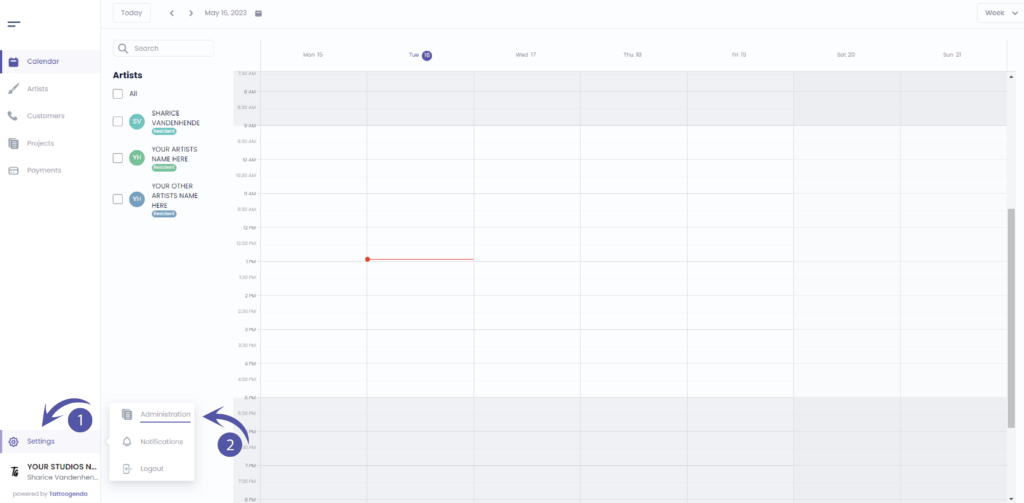
U vindt uw instellingen linksonder in uw scherm boven uw studionaam.
Ga naar je instellingen en kies ‘Administratie’
Je moet automatisch op tabblad staan ‘Winkel’, Als dat niet het geval is, klikt u op winkelen.

INVOICE ADDRESS DETAILS
We partnered up with Stripe to handle secure billing for Tattoogenda subscriptions. Please note that when you paid for your Tattoogenda Subscription,
you already had to fill out your company address and VAT or self employment number. Those invoice details are securely stored with Stripe.
If you wish to update your invoice details click on the article below
The fields listed below are only for your own purpose, and won’t be used on your invoices.
Street & Number
Enter a valid address
City
Enter a valid City
Zip code / Postal code
Enter your valid zip or postal code
Land
Select your country
Enter your VAT number
Select your VAT number if you have one registered

Heb je nog steeds een probleem of een vraag?
Hieronder vind je een kleine link met de naam ‘Nog steeds vast? Hoe kunnen we helpen!’
Geschreven door
Sharice Vandenhende
Door Tattoogenda


 English
  Dutch
Dutch  Dutch (Belgium)
  French
  German
  Spanish