

In uw Tattoogenda studio software,
U vindt uw instellingen linksonder in uw scherm boven uw studionaam.
Ga naar je instellingen en kies ‘Administratie’
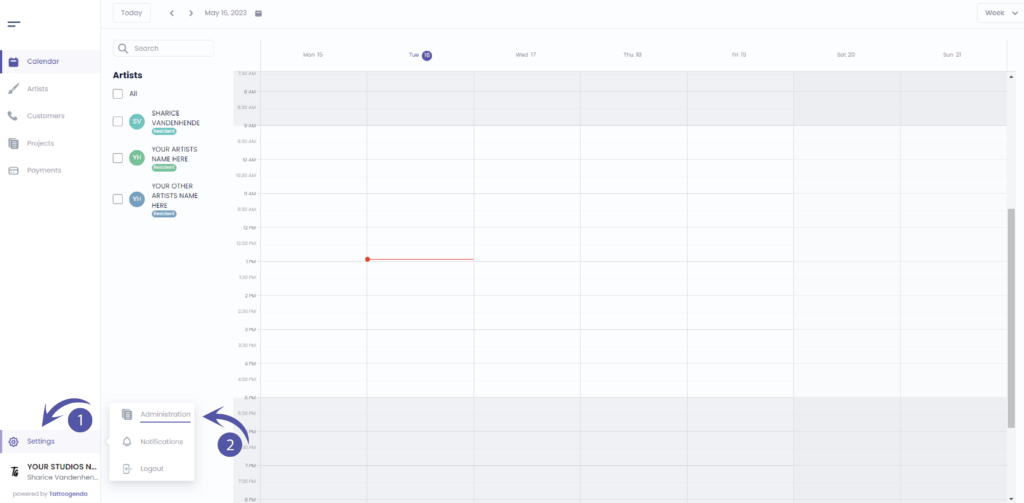
Je moet automatisch op tabblad staan ‘Winkel’, Als dat niet het geval is, klikt u op winkelen.

GENERAL INFO
Shop name
The name artists will be able to see when they are logged into their account.
The name that will display as a variable into your automated emails.
Company name
Your registered / licensed company name for your VAT number for invoices.
Please note if you are using a Third party for deposits your invoice address will be what’s registered with your Stripe or Mollie account.
Company email
The email which u used to create the account.
The email that will receive the communications.
Phone
The phone number will be used as a variable for your automated emails.
Website / Social Media URL
Will be used as a variable to show into your automated emails.

Heb je nog steeds een probleem of een vraag?
Hieronder vind je een kleine link met de naam ‘Nog steeds vast? Hoe kunnen we helpen!’
Geschreven door
Sharice Vandenhende
Door Tattoogenda


 English
  Dutch
Dutch  Dutch (Belgium)
  French
  German
  Spanish