
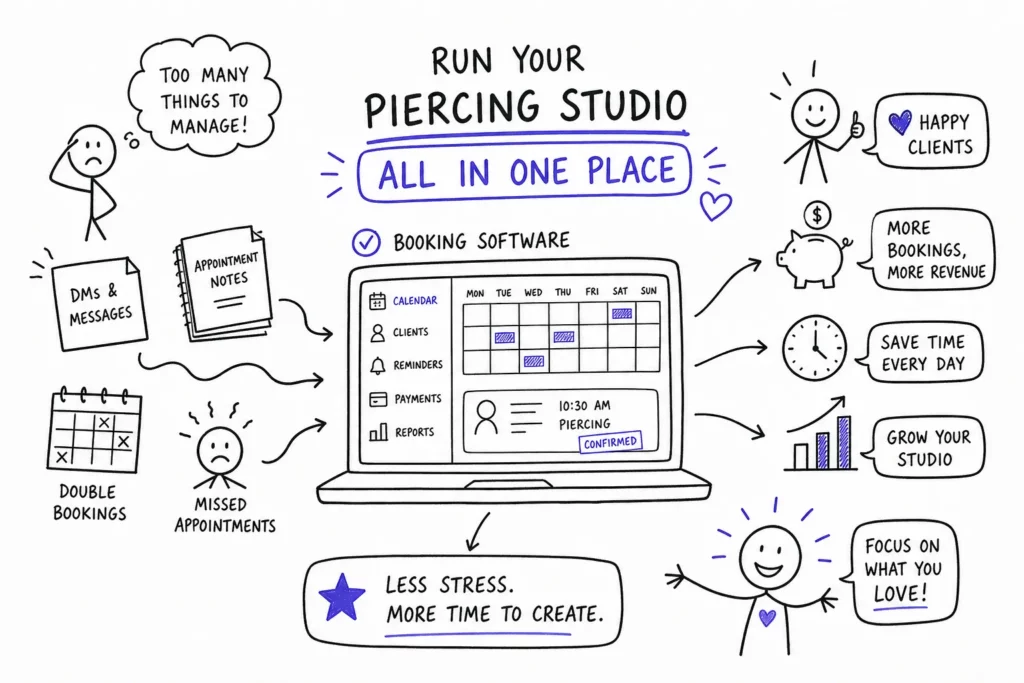
A piercing studio with a packed appointment book and zero open slots sounds like success. But if your booking confirmations live in Instagram DMs, your consent forms are stacked in a binder behind the front desk, and deposits get collected through a patchwork of Venmo requests and bank transfers, you are hemorrhaging clients before they ever sit in the chair. The operational friction may be invisible to you, but it is very visible to your clients, and it shows up in booking drop-offs, no-shows, and one-time visits that never become regulars.
This guide is a practical operating playbook for how to manage a piercing studio with booking software, covering everything from initial configuration to going live without disrupting a single appointment. By the end, you will know how to evaluate and choose booking software that actually fits a piercing studio’s workflow, configure it for your specific setup, and run the migration cleanly. Platforms like Tattoogenda, built specifically for studio operations and designed for tattoo and piercing shops, have shown that the same tools high-volume tattoo studios use to manage multi-artist schedules run piercing workflows just as cleanly. This is not a software review. It is a step-by-step operating guide.
Why Piercing Studios Hit a Wall Without the Right Software
Walk through the average week at a manual studio: a client messages on Instagram to book a nostril piercing, you reply with available times, they confirm two days later, you forget to collect a deposit, and they ghost you on the day. Meanwhile, your paper consent forms from last quarter are technically a compliance liability sitting in a folder that has never been audited. Manual scheduling can consume several hours of admin work every week, and that time belongs on the floor.
The cost is not just the occasional no-show. It is the compounding effect of missed follow-ups, double-booked rooms, inconsistent deposit collection, and client records that live only inside someone’s memory. When a piercer leaves your studio, those client histories leave with them.
A purpose-built studio management platform changes the operating model entirely. Instead of three separate tools and a notes app, one system handles scheduling, deposits, consent forms, payments, and client history from the first booking click through the post-appointment aftercare follow-up. Not all booking software delivers this, though. Generic salon apps often lack the fields a piercing studio actually needs: jewelry gauge, placement notes, healing stage, health history relevant to metal sensitivities. That gap is exactly where industry-specific platforms earn their value.
How to Manage a Piercing Studio with Booking Software: Must-Have Features
Real-time calendar management is the foundation of any effective appointment scheduling for piercers. Each piercer needs their own availability, their own service menu, and their own booking link so clients land in the right hands without front-desk intervention. Staff permission levels matter just as much: a junior piercer should not have access to another artist’s client records or financial data, and the software should enforce those boundaries by role, not by trust.
Service Duration Settings
Service duration settings are often overlooked during the buying decision and cause real problems after setup. A nostril piercing typically runs 15 to 30 minutes depending on the piercer and client; an industrial or surface anchor takes considerably longer. The booking engine needs to handle variable-duration services without requiring manual adjustment each time a client selects a service.
Deposit Rules and Payment Processing
Deposit collection is non-negotiable for piercing studios. Body piercing appointments require preparation: jewelry sourcing, sterilization, room setup. A deposit filters uncommitted clients and offsets the cost of a no-show. The piercing studio booking software should handle the full deposit logic automatically, deposit amount or percentage collected at booking, automatic application to the final balance, and forfeiture rules tied to your cancellation window. An integrated POS rounds this out because a studio that sells aftercare products and jewelry needs service charges and retail charges to live in the same transaction. When you evaluate systems, compare their published booking app features to ensure the deposit and POS flows are built-in rather than bolted on.
On pricing: most mid-market studio management tools in 2026 land between $24 and $50 per month for a small piercing studio, with per-staff fees of $10 to $20 per additional calendar and card processing rates in the range of 2.4% to 2.9% per transaction. Premium all-in-one platforms can reach $165 or more per month at scale. Free starter tiers exist but rarely handle the digital consent forms for piercing and deposit complexity a studio requires. Evaluate on total cost of ownership, not sticker price: software subscription plus transaction fees minus the hours you stop spending on admin.
Setting Up Schedules, Rooms, and Staff to Prevent Double Bookings
The right mental model here is resource allocation, not just time-slot management. A booking is only confirmed when the required piercer, the required room, and any shared equipment are all free for the full duration of the appointment. The software’s job is to check all three simultaneously before locking the slot.
Setup works like this: create each piercing room or station as its own resource inside the platform, assign services to the rooms and equipment they require, and let the booking engine handle conflict checking automatically. This matters more in piercing than in most service industries because cross-contamination protocols require preparation time between clients. Buffer blocks between appointments are not a courtesy feature here; they are a health and safety requirement.
In a multi-piercer environment, each piercer sets their own hours, days off, and service offerings while the central admin sees a unified calendar across all staff and all rooms. If your studio runs more than one location, each branch gets its own calendar, its own hours, and its own resource list, but the owner views everything from a single dashboard. If you need tools for coordinating traveling artists or short-term hires, learn how to manage guest artists across locations.
If a senior piercer floats between two locations, the software should block the same time at both sites once a booking is confirmed and factor in any travel or transition time between them. These are distinct operational scenarios, and a capable booking system for body-piercing studios handles all three without custom workarounds.
Digital Consent Forms and Client Records Built for Piercers
Sending digital consent forms for piercing with the booking confirmation is one of the highest-leverage changes a studio can make. The client arrives already informed, the paperwork is done before they walk in, and the studio holds a timestamped legal record tied to that specific appointment. A piercing-specific consent form should capture age verification or parental consent for minors, health history relevant to healing (blood thinners, keloid history, metal sensitivities), jewelry preferences, and acknowledgment of aftercare instructions.
Secure storage is not optional. Forms must be encrypted, cloud-stored, and retrievable by appointment date and client name. Local law controls retention requirements, so the software organizes compliance but does not replace the studio’s obligation to follow state or local regulations. Florida, for example, requires specific notarized parental consent for minors seeking body piercings, verify current state requirements with a local compliance resource, as regulations can change.
The client profile is your studio’s institutional memory. Every placement, every jewelry change, every healing note, and every intake response stored in one place and accessible before the next visit. A piercer who pulls up a returning client’s full history can skip the intake interview and spend that time on the service itself. Tattoogenda’s client history and profile tracking applies the same record system high-volume tattoo studios use to manage multi-session projects directly to a piercer tracking a client’s healing progress across multiple visits. The data model is the same; the context is piercing-specific.
Cutting No-Shows with Deposits and Automated Reminders
A policy that is not displayed prominently and enforced consistently is not a policy. It is a suggestion. The most effective deposit and cancellation policies are simple, visible, and applied the same way every time, regardless of how long the client has been coming to your studio.
Here is a practical policy template you can use immediately:
- A non-refundable deposit is required at booking and applied to the final service total.
- Cancellations or reschedules made with less than 48 hours’ notice forfeit the deposit.
- No-shows forfeit the deposit, and a new deposit is required to rebook.
- One free reschedule is allowed with more than 48 hours’ notice.
This policy should appear before checkout on the booking page, in the confirmation email, and in each reminder message. Ambiguity creates disputes. Clarity prevents them.
Automated reminders handle the execution. A reminder sequence that works well for piercing studios: a confirmation message immediately after booking, a 48-hour reminder with the cancellation policy restated, and a same-day reminder two hours before the appointment. In practice, most no-shows are accidental rather than intentional, a well-timed reminder sequence catches the majority of them before they become lost appointments. The two-way communication benefit compounds this: clients who need to reschedule can reply directly to the reminder, and the software updates the calendar without the front desk getting involved.
How to Manage a Piercing Studio with Booking Software: Going Live Without Shutting Down
Migration does not require downtime. It requires sequencing. Work through this checklist in order and you will have a clean launch with no disruption to existing clients.
- Export all existing client data and appointment history from your current system or spreadsheet before touching anything in the new platform.
- Set up staff profiles, service menus, and piercing room resources in the new software before the public booking link goes live.
- Build and test digital consent forms with a sample booking before any real client interacts with them.
- Configure deposit rules, cancellation policy text, and payment processing in staging mode and verify the deposit flow end-to-end.
- Run a soft launch with a small group of loyal clients to surface edge cases: a service duration set slightly off, a consent form field that confuses first-timers.
- Flip the public booking link live and redirect all old channels, including your social bio links and Google Business listing, to the new booking URL.
Do not archive old client records until they are fully imported and verified in the new system. Running both systems in parallel for two to three weeks is inconvenient; losing client history is a much larger problem.
In your first 30 days live, track three metrics: booking completion rate (are clients finishing the online booking flow without dropping off?), deposit capture rate (are deposits collected on every appointment?), and no-show rate compared to the same period before the switch. The first two weeks often surface small friction points. Treat that feedback as the final tuning phase, not a sign the platform is wrong. Once the system runs cleanly, your job shifts from managing logistics to reviewing analytics and making growth decisions with real data in front of you.
The Shift from Friction to Focus
Managing a piercing studio with booking software is not about adding more tech to your operation. It is about removing the manual friction that stands between a piercer and the work they actually want to do. Every hour spent chasing deposit confirmations and printing waivers is an hour not spent on client care, artist development, or building the studio’s reputation.
The wins compound quickly. Automated scheduling prevents double bookings. Enforced deposits filter no-shows before they happen. Digital consent forms protect the studio legally and operationally. Client history makes every return visit faster and more professional. Automated reminders handle follow-up without any staff time at all.
Tattoogenda was built for studio owners who ran into every one of these problems firsthand. The platform handles the full workflow, from the first booking click to post-appointment client records, and the same setup used by high-volume tattoo studios applies directly to piercing operations of any size. Explore what Tattoogenda can run for you and see how to manage a piercing studio with booking software on your own terms.
 English
  Dutch
Dutch  Dutch (Belgium)
  French
  German
  Spanish