

In Ihr Tattoogenda Studio-Software,
finden Sie Ihre Einstellungen unten links auf Ihrem Bildschirm über Ihrem Studionamen.
Gehen Sie zu Ihren Einstellungen und wählen Sie ‘Verwaltung’.’
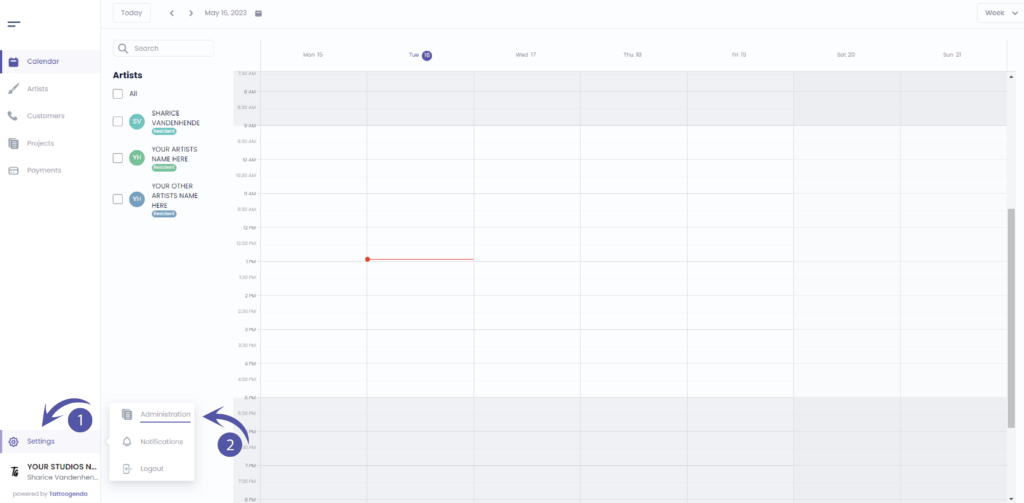
Sie sollten automatisch auf dem Laufenden sein ‘Laden’.’, Wenn Sie es nicht sind, klicken Sie auf Shop.

GENERAL INFO
Shop name
The name artists will be able to see when they are logged into their account.
The name that will display as a variable into your automated emails.
Company name
Your registered / licensed company name for your VAT number for invoices.
Please note if you are using a Third party for deposits your invoice address will be what’s registered with your Stripe or Mollie account.
Company email
The email which u used to create the account.
The email that will receive the communications.
Phone
The phone number will be used as a variable for your automated emails.
Website / Social Media URL
Will be used as a variable to show into your automated emails.

Sie haben noch ein Problem oder eine Frage?
Nachstehend finden Sie einen kleinen Link mit der Bezeichnung ‘Stecken Sie immer noch fest? Wie können wir helfen?’
Geschrieben von
Sharice Vandenhende
Unter Tattoogenda


 English
  Dutch
Dutch  Dutch (Belgium)
  French
  German
  Spanish