
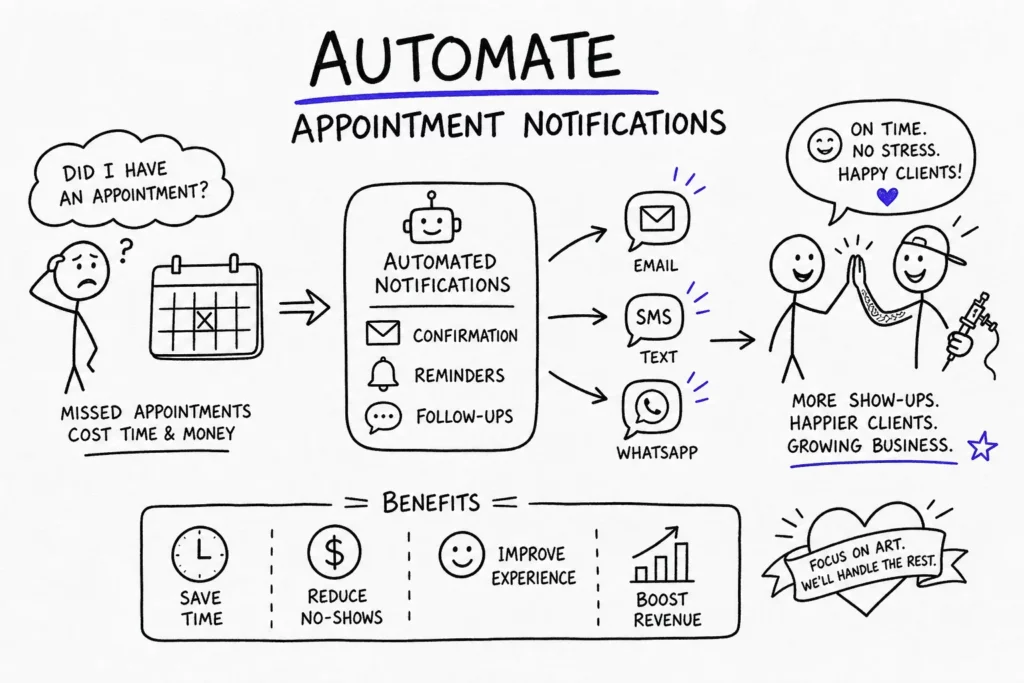
A packed booking calendar looks like success until you watch half of Tuesday evaporate because two clients didn’t show up and one didn’t respond to a single message. That gap between a booked appointment and a client who actually walks through the door is where tattoo studios quietly bleed revenue, a problem that almost every shop owner eventually gets genuinely fed up with. If you’re wondering what is the best way to set up automatic appointment notifications for tattoo clients, this guide covers exactly that: how to choose the right platform, which reminder timing sequence works, copy-ready SMS and email templates, and the compliance basics that protect your shop under TCPA and CAN-SPAM rules. The fix isn’t chasing clients down manually or hoping for the best. It’s automating your entire notification flow so reminders go out without you ever touching them.
If you’re looking for a setup you configure once and never have to babysit again, that’s exactly what this is.
Why no-shows cost tattoo studios so much
The real cost of a missed appointment in a tattoo studio
A tattoo session isn’t a 30-minute haircut. A single booking can tie up an artist for two to eight hours, which means one no-show can eliminate a large portion of an artist’s daily revenue, especially for longer sessions. Unlike a coffee shop that loses one drink order, your artist loses the whole shift, and there’s no realistic way to fill that slot on short notice when every piece requires consultation, setup, and a client who has committed to the design.
For multi-artist studios, this compounds quickly. Three artists, two no-shows each week, and you’re looking at a consistent revenue leak that never shows up in your books as anything other than “quiet days.” The actual cost, when you account for lost artist time, blocked stencil prep, and unused materials, is almost always higher than studio owners realize until they calculate it intentionally.
How client behavior changes when reminders are automated
Studies on appointment-based businesses, including data from scheduling platforms and healthcare appointment research, consistently recommend the same approach: send an immediate confirmation after booking, followed by reminders at 48 and 24 hours before the session. The psychology behind this isn’t complicated. People forget, schedules shift, and a well-timed message either reinforces a client’s commitment or gives them an early chance to reschedule before it costs you anything.
SMS is especially effective for automated appointment reminders. According to figures widely cited by platforms such as SimpleTexting and Klaviyo, open rates for appointment reminder texts run between 90 and 98 percent, compared to roughly 20 to 30 percent for email, with SMS response rates outpacing email by a similarly wide margin. That doesn’t mean email is useless, but SMS should carry the core reminder weight while email handles longer prep details and policy information.
What is the best way to set up automatic appointment notifications for tattoo clients
What features actually matter for a tattoo studio
Not every scheduling app was designed with a tattoo studio’s workflow in mind. General tools can handle basic automated reminders, but they typically require workarounds for deposit enforcement tied to cancellation policies, digital consent form collection, client history tracking, and artist-specific scheduling rules. When you have to stitch three separate tools together to replicate what one purpose-built platform handles natively, you’ve already introduced friction that will cost you time every week.
The features that matter most for tattoo-specific reminder automation include SMS and email reminders without per-message fees that add up unpredictably, deposit collection tied directly to the booking flow, digital consent forms, and a client record system that stores ink history and preferences. If a platform handles all of these in one place, you’re working with a real operational tool rather than a patched-together setup. For a broader look at options designed for studios, see resources on scheduling tools for tattoo studios.
Tattoogenda: built around how tattoo studios actually work
Tattoogenda is a studio management platform built specifically for tattoo and piercing shops, and that focus shows in the way its reminder system is structured. During onboarding, you configure your notification sequences, message templates, and timing rules in a single session. After that, every new booking automatically triggers the complete reminder flow without any manual input from you or your front desk. For studios managing multiple artists or locations, that level of automation is a meaningful operational advantage, every client gets the right messages tied to their correct artist and appointment details from day one. Learn more about automated flows in Automated Email & SMS Reminders That Cut Tattoo No-Shows.
The platform also supports deposit collection and booking-linked payment flows within the same booking interface, so the reminder sequence and the financial protection work together rather than existing as separate systems you have to keep synchronized. That integration is where most general-purpose scheduling apps fall short when studios try to adapt them to a tattoo workflow.
How general scheduling apps compare
Tools like Acuity Scheduling, Square Appointments, and Bookedin can all generate automated reminders, and several include SMS on paid plans. Bookedin, for example, supports up to three reminders per appointment with confirm, cancel, and reschedule links. The trade-off is that these platforms were built for general appointment businesses, not specifically for tattoo studios, so deposit enforcement, consent forms, and ink history tracking typically require workarounds or additional integrations.
If your only goal is basic reminder automation and your studio’s other workflows are already covered elsewhere, a general tool will work. If you want the full client journey, from booking through consent form to post-session review, handled in one place, a tattoo-specific platform is the faster path to a setup that actually runs itself.
The reminder sequence that actually reduces no-shows
Immediate booking confirmation: the first message is the most important
The confirmation message sent the moment a client books is the most important communication in the entire sequence. It should include the appointment date, time, artist name, studio address, and a clear restatement of your deposit and cancellation policy. This message does two things at once: it reassures the client the booking is real, and it sets expectations around your no-show policy before they’ve had a chance to forget any of it. Keep it short enough to read in under 30 seconds and make sure your policy language appears in plain terms, not buried in a link.
48-hour and 24-hour reminders: the core of your sequence
A 48-hour reminder gives clients enough lead time to reschedule if something genuinely comes up, which protects your calendar because you can potentially refill the slot. The 24-hour follow-up keeps the appointment front of mind and is the right moment to include a simple confirm-or-reschedule prompt. Research on multi-touch reminder strategies supports using at least two pre-appointment touchpoints, studios relying on a single reminder sent several days out tend to see higher last-minute cancellations and no-shows than those running a two-step sequence closer to the appointment.
If a client doesn’t respond to your 48-hour message, the 24-hour reminder becomes your safety net. Some platforms, including Tattoogenda, allow you to flag non-responders and trigger a follow-up via a different channel, which can recover bookings that would otherwise silently fall through.
Day-of reminder and when to add prep instructions
A final reminder sent two to four hours before the session catches last-minute conflicts and gives clients one more chance to reach out before they simply don’t show. For first-time clients or long sessions, this is also the right moment to include brief prep instructions: eat beforehand, stay hydrated, wear loose clothing that provides access to the tattoo area, bring a valid ID, and avoid alcohol. Clients who arrive prepped are easier to work with and less likely to bail at the door.
SMS and email templates that work for tattoo clients
What every reminder message needs to include
Regardless of channel, every reminder should lead with the essential details: client name, appointment date and time, artist name, and studio address. It should include a single clear action, confirming, rescheduling, or calling the studio, and a brief restatement of your deposit and no-show policy. Short, specific, and policy-forward messages consistently outperform vague generic reminders because they give clients everything they need to act without creating confusion about what to do next.
SMS appointment reminders for clients: brief, scannable, and direct
SMS reminders should stay as close to 160 characters as possible for readability and deliverability. A strong 48-hour SMS reads like this: “Hi [Name], your tattoo with [Artist] is [Day] at [Time]. Reply C to confirm or text [Number] to reschedule. No-show policy applies.” That format is short enough to read in a glance and direct enough to prompt a response. The 24-hour version can mirror the same structure with the addition of “tomorrow” to create urgency without adding length. For copy-ready examples, see Tattoo Appointment Alerts: 12 Templates to Cut No-Shows and external reminder examples like tattoo appointment reminder message templates.
Email templates: more room for prep details and policy
Email is the right channel for longer prep instructions, full cancellation policy text, and any design reference attachments a client should review before the session. Use clear subject lines like “48-hour reminder: your tattoo appointment on [Date]” and structure the body so the essential appointment details appear in the first two lines. Save prep information, hydration tips, clothing guidance, and session length expectations, for a scannable list below the core details, so clients who only skim the top still get the critical information.
Compliance basics before you send automated messages
SMS and the TCPA: what consent actually requires
In the United States, the TCPA draws a distinction between purely informational appointment reminders and messages that include any promotional content. For reminders that stick strictly to appointment details, prior express consent, which a client typically provides when giving you their phone number at booking, is generally sufficient. If your reminder includes any promotional language, offers, or upsells, prior express written consent is required, and that means a clear, documented agreement before you send the first text. For a useful summary of current SMS marketing regulations and what constitutes required consent, review that guidance as part of your compliance checklist.
Regardless of message type, it’s recommended practice to include your business name in every SMS, add a simple opt-out instruction such as “Reply STOP to opt out,” and send messages only between 8 a.m. and 9 p.m. local time, a window commonly cited by TCPA compliance guidance, though specific rules can vary. Keep records of when and how each client consented. Those records are your protection if a complaint is ever filed. For detailed operational guidance on FCC/TCPA consent for appointment reminders, see the FCC TCPA consent guidance for appointment reminders.
Email compliance under CAN-SPAM
CAN-SPAM does not require prior consent for transactional or service emails, but it does require accurate sender information, a truthful subject line, your business’s physical mailing address, and a working opt-out link in any promotional message. Appointment confirmations and reminders are generally classified as transactional, which means the opt-out requirement is less stringent. However, if your reminder email includes any promotional language, standard CAN-SPAM rules apply fully, including the requirement to process opt-out requests within 10 business days.
A simple consent approach that covers your studio
The most practical compliance setup is a single checkbox on your booking form with clear disclosure language. Something like: “By checking this box, you agree to receive automated text messages and emails from [Studio Name] about your appointment. Reply STOP to opt out of texts at any time.” This approach is straightforward to implement inside any booking platform and keeps your consent log automatically tied to each booking record. Note that this language is appropriate for informational appointment reminders, if you plan to send promotional or marketing texts, you’ll want a separate, clearly worded written consent that meets TCPA’s prior express written consent standard. Set the right consent fields up once and they handle every new client from that point forward.
Configure your reminder system once and let it run
What a one-time setup actually looks like
The setup process in a purpose-built platform comes down to three main steps: connect your calendar and artist profiles, build your message templates for each reminder touchpoint (confirmation, 48-hour, 24-hour, and day-of), and set the trigger rules so each message fires automatically at the right interval after a booking is created. Once those rules are saved, no manual intervention is needed for future bookings. The system handles every client communication from the moment they book to the hour they arrive.
How Tattoogenda handles this during onboarding
Tattoogenda guides new studios through this configuration during the initial onboarding process. You set your reminder timing, write or customize your message templates, and confirm how deposit and cancellation policy language should appear in each notification. After that, the system handles every booking from every artist automatically. According to the platform’s onboarding documentation, a multi-artist studio can configure artist-specific templates in the same session, so every client receives reminders that reference their correct artist and appointment details without additional work after the initial setup. For step-by-step setup guidance, see appointment reminder setup: reduce no-shows with SMS & email, tattoogenda.com.
Testing your flow before going live
Before activating notifications for real clients, run a test booking through your own system using a personal phone number and email address. Verify that each message arrives at the right time, the merge tags pull accurate details, and the opt-out language is present in every SMS. Catching a broken merge tag or wrong timing rule during testing costs nothing. Catching it after a client receives a garbled or inaccurate reminder costs you credibility and, potentially, the booking. Five minutes of testing before launch is one of the highest-return actions you can take during setup.
Build it once, protect your calendar permanently
Automatic appointment notifications for tattoo clients are one of the most practical operational improvements a studio can make. They reduce no-shows, protect artist time, and create a more professional client experience with minimal ongoing effort. The core decisions are straightforward: choose a platform built for your actual workflow, build a confirmation-plus-multi-reminder sequence, write short and policy-forward message templates, and stay compliant under TCPA and CAN-SPAM rules.
Now that you understand what is the best way to set up automatic appointment notifications for tattoo clients, the next step is putting those platform and sequence choices into practice. With a tool like Tattoogenda, you configure the entire system during onboarding and it runs automatically for every booking after that. No manual follow-up, no chasing clients, no revenue disappearing into missed appointments a single automated text would have saved. Set it up right once and your reminder system becomes part of the studio’s infrastructure rather than another task on your weekly list.
If you’re ready to get that system in place, Tattoogenda’s onboarding is built to help get your full reminder flow active quickly, ideally before your next booking lands on the calendar. The sooner it’s running, the sooner every appointment is backed by automated protection.

 English
  Dutch
Dutch  Dutch (Belgium)
  French
  German
  Spanish